
Turnkey is an external authentication and key management service integrated into Polyester. It enables users to access a non-custodial Polyester account using Google or email, without managing private keys directly.
Why Turnkey Exists
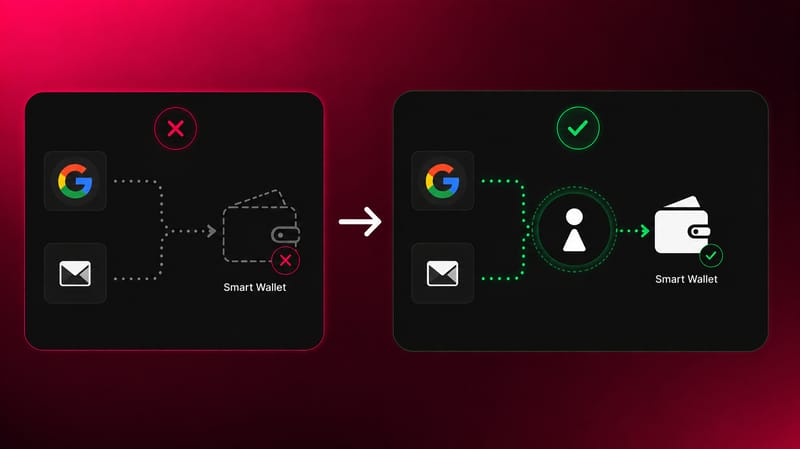
A smart wallet must have a wallet address as its owner. It cannot be owned by a Google account or email directly. Turnkey solves this by generating a real wallet for the user behind the scenes:
- The user chooses Google or email as their login method
- Turnkey generates an EOA secured inside a hardware-protected enclave. This EOA is never exposed to Polyester
- The user's Google account or email authenticates access to that EOA, not to the smart wallet directly
- That Turnkey EOA is set as the owner of the user's smart wallet
The result is a fully non-custodial account. Polyester never controls the private keys, and the user never has to manage them directly.
Security
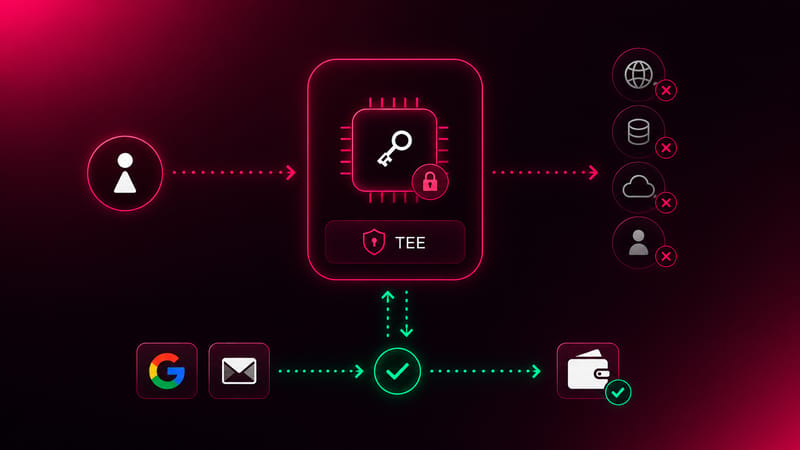
Turnkey protects private key material using a Trusted Execution Environment (TEE):
- Private keys are never stored unencrypted
- Decryption happens exclusively inside the secure enclave, never outside it
- The enclave has no external network access and no persistent storage
- Polyester cannot access or retrieve the keys at any point
Authentication works by proving control of the Google account or email, which signals to Turnkey to authorize wallet actions without the key ever leaving the enclave.
Exporting Keys
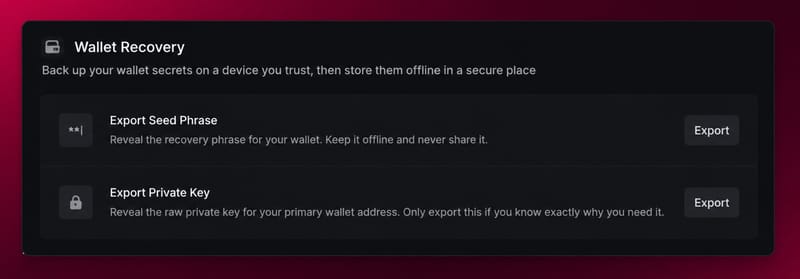
Users who logged in via Turnkey can export the underlying EOA credentials from Settings → Security, in the Danger Zone section. Exporting allows the wallet to be used independently of Turnkey and serves as a recovery path if Turnkey services are ever disrupted.
Two export options are available:
- Export Seed Phrase: reveals the recovery phrase for the Turnkey EOA. A seed phrase is a sequence of words that can be imported into any compatible wallet application (such as MetaMask or Phantom) to restore full access to the same wallet and address. Once imported, the wallet can be used on any platform that supports standard wallet recovery.
- Export Private Key: reveals the raw private key for the wallet address. Like a seed phrase, a private key can be imported into any compatible wallet application to access the same wallet directly.
Store either export offline and never share it with anyone. Anyone who has access to either can fully control the wallet.